Why we migrated to PNPM?
Why we migrated to PNPM?
It’s incredible how much the landscape of front-end development has transformed in the past few years. When I first entered the enterprise front-end engineering domain, the tools and practices we used were quite different from what we have today.
Speaking of <a href="https://nodejs.org/en" class="fenced-link">Node.js</a> package managers, back in the day, <a href="https://www.npmjs.com/" class="fenced-link">npm</a> was the undisputed go-to for JavaScript projects. It boasted a vast repository of packages and streamlined the process of managing dependencies, coming pre-packaged with Node.js as the default package manager. However, there were always those rogue developers who opted to use Yarn, a newer package manager introduced by Facebook at the time. I was fortunate enough to work on such a project during my internship back in 2017.
When I joined WSO2 in 2019 with the Identity Server team, they had just initiated the <a href="https://github.com/wso2/identity-apps" class="fenced-link">identity-apps</a> project. This project was started to pave the way for the new Identity Server front-end apps, which were about to be rewritten in React. At that time, npm served as the reliable backbone for managing dependencies, ensuring smooth operations throughout the development process.
During our tenure of utilizing npm for a couple of years, we encountered several challenges that prompted us to re-evaluate our choice of package manager. These issues included:
- Sluggish Installation Process:
npminstalls tended to be sluggish, resulting in longer wait times during the development and build processes. This hindered our team’s productivity and efficiency, leading us to seek alternatives with faster installation times. - Cache Corruption: Another recurring issue we faced was the occasional corruption of the npm cache. This could lead to perplexing troubleshooting scenarios, consuming valuable time and effort as we worked to resolve the underlying cache-related issues.
- Sparse Updates: We observed that
npmreceived updates less frequently compared to other package managers, potentially lagging behind in terms of performance enhancements and feature updates. This misalignment with evolving industry standards and best practices motivated us to explore alternatives that offered more frequent updates and improvements. For instance,npmtraditionally lacked built-in support for managing monorepos and dependencies between packages, which could lead to increased complexity and potential maintenance overhead. - Compatibility Challenges: As
npmevolved, it introduced changes that occasionally disrupted compatibility with existing projects. For instance, the introduction of peer dependency-breaking changes in npm 7 posed compatibility challenges for our current Identity Apps, necessitating updates and modifications to ensure seamless integration.
We tried to solve the issues by switching to Yarn (Yarn Classic) in 2020, but we ran into problems with our Jenkins build environment. This forced us to go back to using npm.
Finally, in 2022, we revisited our approach to package management and explored alternative solutions to address the persistent challenges we faced.
In this post, I’ll be presenting a comparison of the package managers we considered. Let’s dig deep into how we approached our package management challenges in 2022.
Candidates
Yarn Classic
Yarn Classic is an earlier version of the Yarn package manager, which significantly contributed to improving JavaScript dependency management. You can find its documentation here and its source code on GitHub.
Features
- Parallelizes operations to speed up the installation process.
- Native monorepo support with yarn workspaces.
- Installs can be cached. offline caching is also possible.
Drawbacks
Yarn Classicwent into maintenance mode in 2020.
Project Structure
├── .yarn/
│   ├── cache/
│   └── releases/
│       └── yarn-1.22.17.cjs
├── node_modules/
├── .yarnrc
├── package.json
└── yarn.lock
Yarn (v2, Berry)
Yarn 2, also known as Yarn Berry, represents a significant evolution in package management for JavaScript projects. It introduces innovative concepts such as Plug’n’Play (PnP), which aims to streamline dependency resolution and improve performance by eliminating the need for node_modules folders. You can access the documentation for Yarn 2 here, and its source code is available on GitHub.
Features
- Introduces Plug’n’Play(PnP) concept.
- Ditches the generation of
node_modulesfolders. Rather it creates a single.pnp.cjsfile containing a map of links to the package's location inside the disk. - Every package is stored as a zip file inside the
.yarn/cache/folder.
Drawbacks
- In my opinion,
Yarn BerryhurtYarn. Developers were hesitant to abandon the familiarnode_modulesconcept, and there were compatibility issues withYarn Classic. More details can be read here. - PnP is the default behavior.
- Another plugin is needed to revert back to using
node_modulesfolders. - The preferred way to install it is using corepack.
Project Structure
├── .yarn/
│   ├── cache/
│   ├── releases/
│   │   └── yarn-3.1.1.cjs
│   ├── sdk/
│   └── unplugged/
├── .pnp.cjs
├── .pnp.loader.mjs
├── .yarnrc.yml
├── package.json
└── yarn.lock
pnpm
pnpm offers an innovative approach to package management for JavaScript projects. It aims to improve efficiency and reduce disk space usage by leveraging symlinks and a shared store for package dependencies. For documentation, visit the official website, and the source code is available on GitHub.
Features
- Drop-in replacement for
npm. - Faster than
Yarn. - Addresses the issue of having the same dependencies in multiple projects which causes the disk storage to increase significantly. Instead of hoisting like
Yarnandnpm,pnpmintroduced an alternative dependency resolution strategy called content-addressable storage. With this, the packages are stored globally in the users’ home folder (~/.pnpm-store/) and inside the project, there is a symlink to the global store. The following image shows how content-addressable storage works.
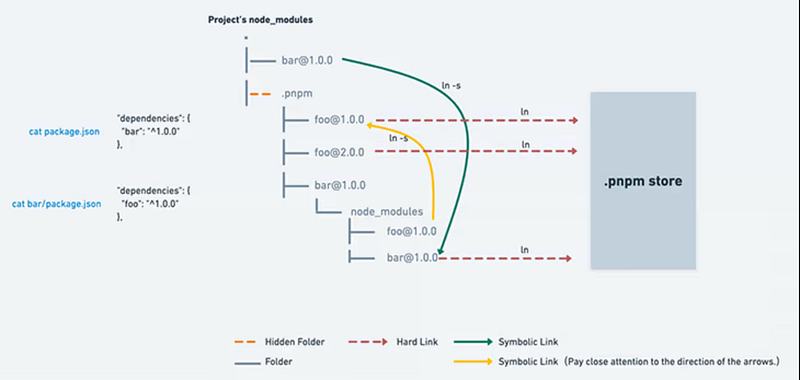
Yarncopies files from the cache whereaspnpmjust links them from the global store.pnpmhas a special file with all the installed packages’ checksums to verify the integrity of every installed package before its code is executed.pnpmsaves all the downloaded package tarballs in a local registry mirror. It never makes requests when a package is available locally. With the — offline parameter, HTTP requests can be prohibited at all.
Folder Structure
├── node_modules/
│   └── .pnpm/
├── .npmrc
├── package.json
└── pnpm-lock.yml
Who uses pnpm
- NextJS: https://github.com/vercel/next.js/
- Vue: https://github.com/vuejs/vue
- More: https://pnpm.io/users
Comparisons
Speed Test
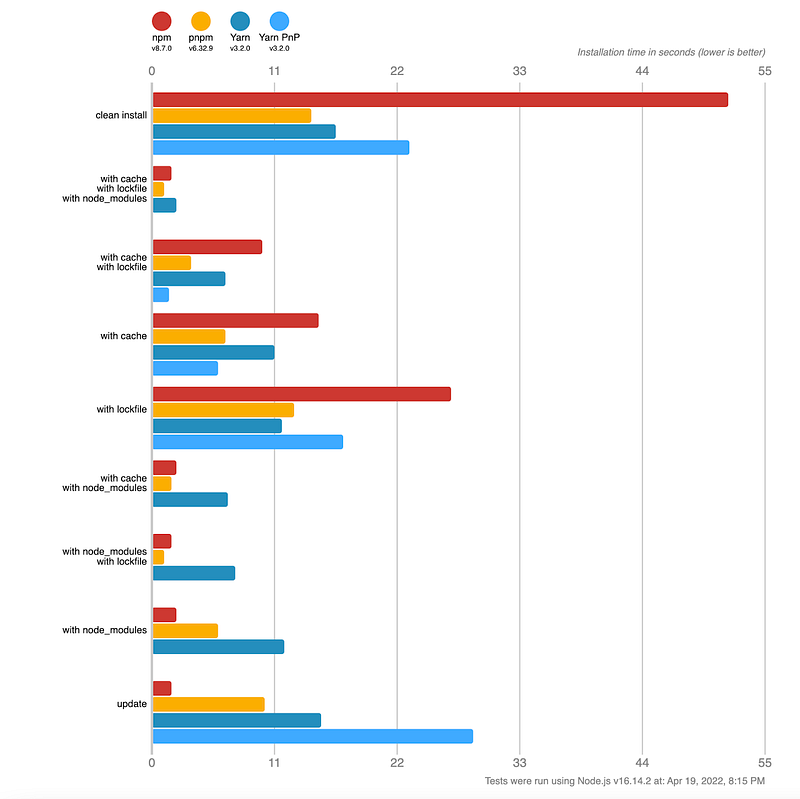
The following diagram shows a speed test between npm, pnpm, Yarn Classic and Yarn Berry .
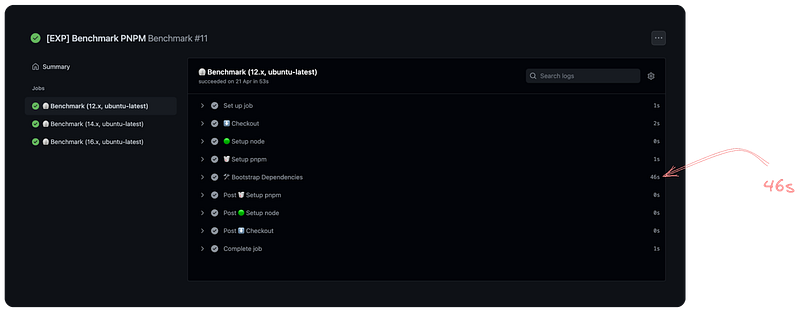
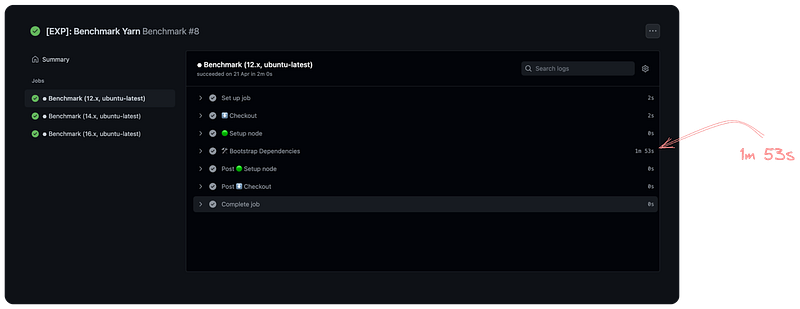
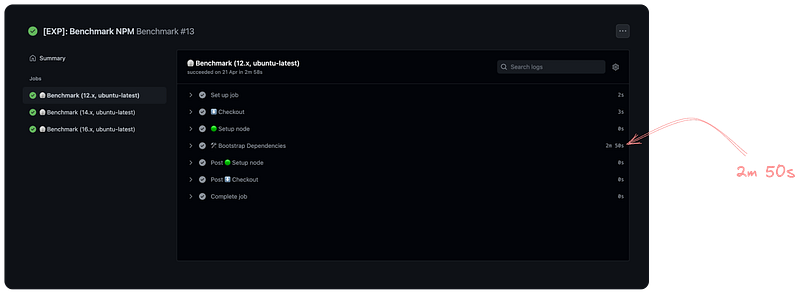
Benchmark on identity-apps
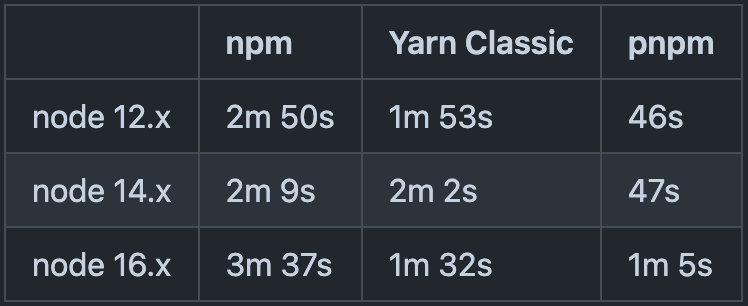
The following comparison shows the performance comparison between <a href="https://github.com/brionmario/identity-apps/pull/2" class="fenced-link">npm</a> , <a href="https://github.com/brionmario/identity-apps/pull/1" class="fenced-link">Yarn Classic</a> & <a href="https://github.com/brionmario/identity-apps/pull/6" class="fenced-link">pnpm</a> on our identity-apps repository.
pnpm
pnpm running on identity-apps on node 12.x in 46 seconds.
Yarn Classic
Yarn Classic running on identity-apps on node 12.x in 1 minute and 53 seconds.
npm
npm running on identity-apps on node 12.x in 2 minutes and 50 seconds.
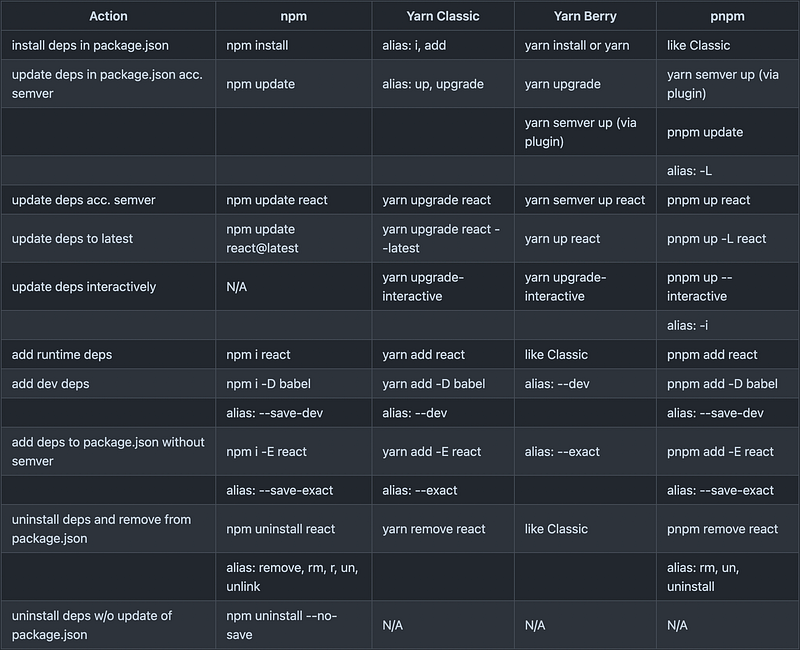
Commands
The following table shows the difference in common commands across npm , Yarn Classic , Yarn Berry & pnpm .
Conclusion
Considering the above-mentioned facts and benchmarks, pnpm emerged as the clear winner in our evaluation. Its innovative approach, efficient dependency resolution, and impressive performance in benchmark tests make it the perfect choice for addressing our package management challenges and enhancing our front-end development workflow.
After 1 year of experience with pnpm, I can confidently attest to its effectiveness and reliability in streamlining our development processes. We have seen a huge boost in local development efficiency and productivity. With faster installation times, reduced disk space usage, and seamless dependency management, our team can focus more on building and iterating on our projects, rather than waiting for packages to install.
Moreover, the integration of pnpm into our Continuous Integration (CI) pipeline has further streamlined our development workflow, ensuring consistency and reliability across all stages of the development process.
Signing off… ✌️❤️
Keep reading
Jul 6