How to fix TS2604: JSX element type does not have any construct or call signatures
How to fix TS2604: JSX element type does not have any construct or call signatures
If you are here, there’s a good chance that you’re scratching your head trying to figure out what caused your code to break suddenly.
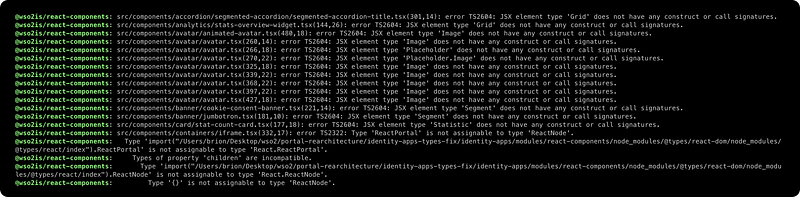
We were in the same situation and the following is the stack trace we received when we did a fresh install on our identity-apps lerna based mono repo.
In this post, I’ll try to explain the procedure we followed to fix the above-mentioned issue.
Troubleshooting 🐞
By looking at the stack trace, it was evident that the issue was with one of the @types packages and specifically we could narrow it down to @react/types after the discovery of this git issue.
Apparently, React 18 typings have breaking changes and most libraries use @types/react: "*" as a peer-dependency that causes the break.
The Fix ☄️
Enough with the causes, let’s look at the fix.
We are not in a position to migrate our codebase to React 18 as of now so we decided to follow the suggested workaround on our repo.
Find the culprits (@types/react v18+)
First, let’s check the @types/react versions used in our mono-repo.
npx lerna exec --no-bail --stream "npm ls @types/react"
Following is an output after the execution of the above command on our setup.
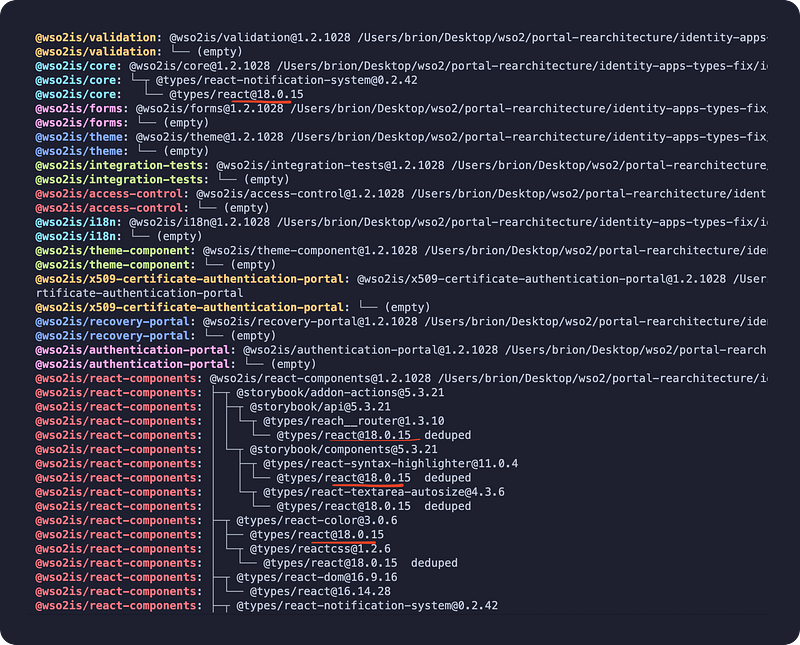
As you can see, there are quite a few occurrences of @types/react v18.x in our project.
If you’re not on a different mono-repo tool like nx or turbo, find the similar command to exec. Or execute
_npm ls_ [_@types/react_](http://twitter.com/types/react "Twitter profile for @types/react")manually inside the packages.
Install **force-resolutions** package
<a href="https://www.npmjs.com/package/force-resolutions" class="fenced-link">force-resolutions</a> was installed instead of the suggested <a href="https://www.npmjs.com/package/npm-force-resolutions" class="fenced-link">npm-force-resolutions</a> package due to this issue.
Since we have quite a few packages, we went ahead and installed it as a dev dependency in the affected modules (where @types/react had been used).
npm install --save-dev force-resolutions
It was mentioned that this step is optional if you’re using yarn. But I couldn’t personally validate.
Add resolutions
In the package.json files of the affected packages, add a resolutions section and force the package manager to use a specific version of @types/react . In our case, we stick with 16.9.0 .
And also add a preinstall script to run the npm-force-resolutions package. As mentioned in the above step, this would be optional if you’re using yarn.
{
    ...,
    "scripts": {
        "preinstall": "npx force-resolutions",
        ...
    },
    ...
    "resolutions": {
        "@types/react": "16.9.0"
    }
}
Re-Validating using npm ls
Then we went ahead and re-installed all our packages once more. And executed the ls command to verify whether our workaround is actually picked up or not.
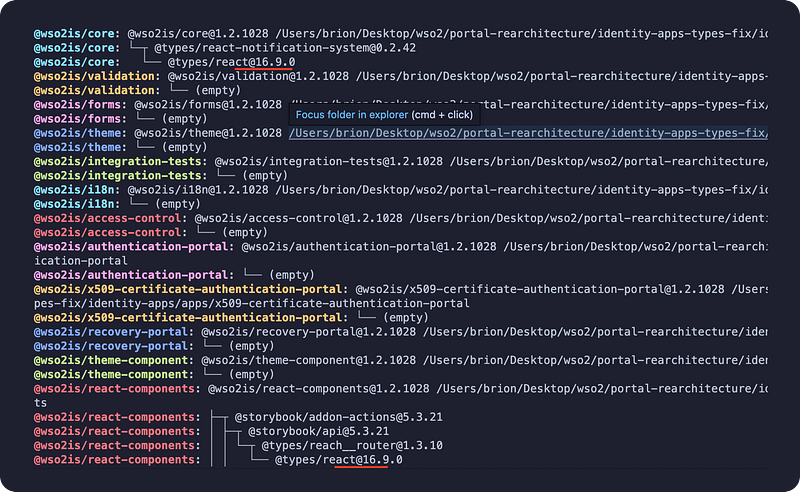
As you can see, @types/react is now resolving to the version 16.9.0 as intended 🎉
Re-validating the Typings
Now that the packages are resolving properly, let's do a build and see if the fix is working.
We have a command to do a type check on our modules so we are going to use that command instead to save some time.
# Execute the relevant build command or typecheck command
npm run typecheck
Hope the guide helps you to overcome this head-scratching issue.
Signing off… ✌️❤️
Keep reading
Apr 16